Explain a trend from the historian
A week of vibration data from the historian, charted and explained, and checked against the maintenance system for a work order.
- Capability
- Live plant data
- Typed by
- Maintenance engineer
- Works with
- Historian (InfluxDB), CMMS (MySQL)
- Delivers
- A chart, the event, and whether anyone is on it
The request, as typed
What happened to MX-301's vibration this week? Show it as a chart, and tell me if there is a work order for it.
How the run worked.
seib-1 never touches a file or a system. It writes each next step as a tool call; seib Cowork checks it, runs it, and sends the result back. Anything that writes waits for a person.
In
What it read
- Historian (InfluxDB)
- CMMS (MySQL)
Model
seib-1
- Plans the task
- Writes each next step as a tool call
- Reads every result before the next
Desktop
seib Cowork runs
- connector_describe: historian, CMMS
- connector_call: Flux query
- connector_call: SQL query
- read_file: the saved result
Person
Reads the answer
- Out: A chart, the event, and whether anyone is on it
- Nothing to approve: every connector was read-only.
Inside the run.
Turns from this run, word for word: the tool calls seib-1 wrote, in the format seib Cowork reads, and what came back. Shortened only where an ellipsis says so.
- 01seib-1Tool call
<tool_call> {"tool": "connector_call", "input": {"connector": "cmms-maintenance", "operation": "query", "input": {"sql": "SELECT wo_number, asset_id, type, priority, status, description, due_date FROM work_orders WHERE asset_id = (SELECT id FROM assets WHERE asset_tag = 'MX-301') ORDER BY due_date DESC"}}} </tool_call> - 02CoworkTool result
0 rows, columns: wo_number, asset_id, type, priority, status, description, due_date
(no rows)
- 03seib-1Tool call
<tool_call> {"tool": "connector_call", "input": {"connector": "historian-influxdb", "operation": "query", "input": {"flux": "from(bucket: \"plant\") |> range(start: -7d) |> filter(fn: (r) => r[\"_measurement\"] == \"vibration\" and r[\"tag\"] == \"MX-301\") |> group(columns: [\"_field\"]) |> aggregateWindow(every: 1h, fn: mean, createEmpty: false)"}}} </tool_call> - 04CoworkTool result, shortened
168 rows, columns: table, _time, _start, _stop, _field, _value
Saved in full as @connector-data/historian-influxdb-query-20261128-231736-12.csv — read it with read_file (offset/limit), or pass it to write_xlsx (rows_from) or fill_template … without copying the rows. …
What it did.
Nothing to approve: every connector it used was read-only.
- 1
Described the historian and the maintenance system.
- 2
Queried a week of MX-301 vibration as hourly means.
- 3
Checked the maintenance system for any work order on MX-301, in any status.
- 4
Drew the week as a chart in the answer.
What came back.
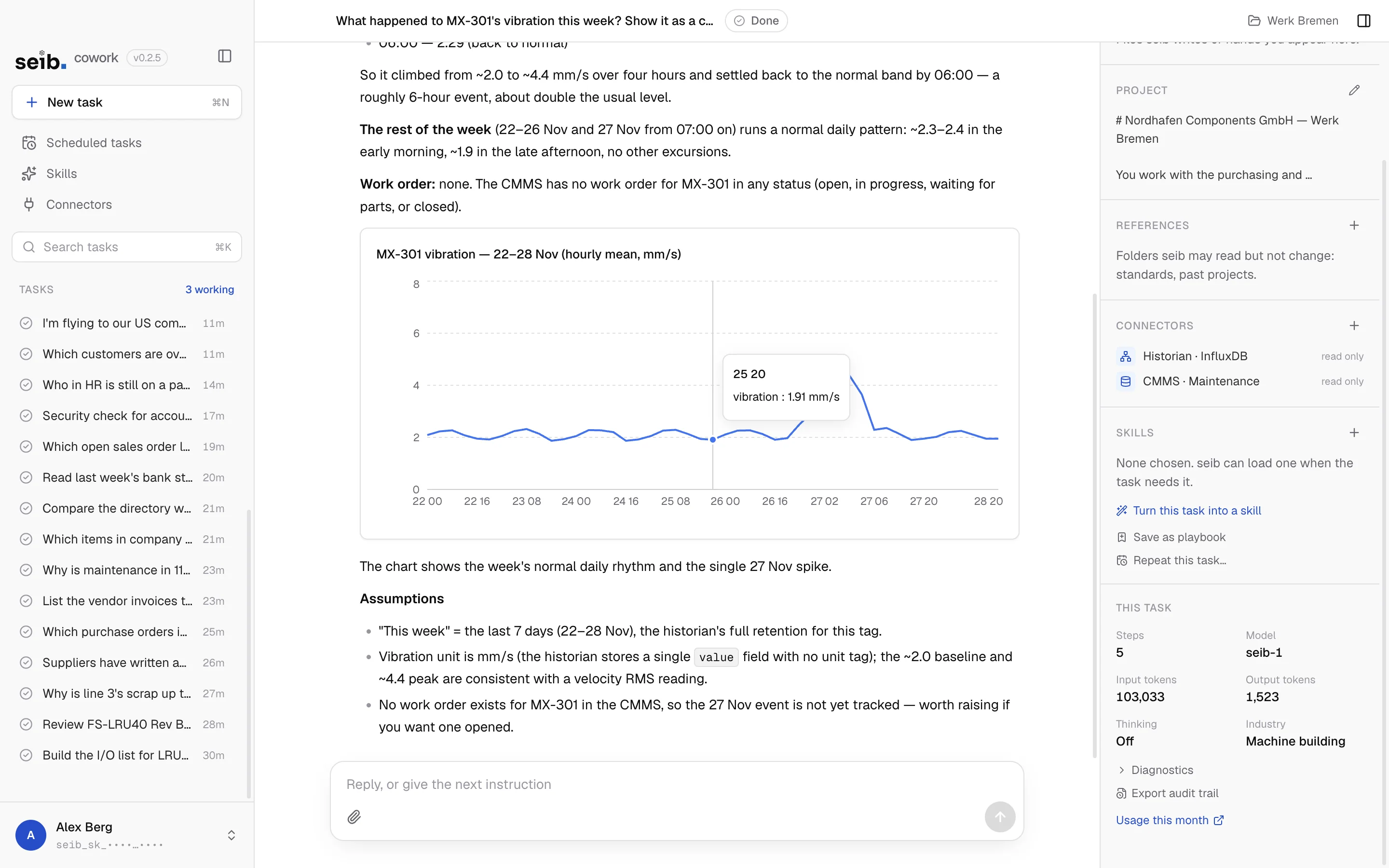
Vibration was normal all week except one event: on the night of 27 November it climbed from about 2.0 to 4.4 mm/s over four hours and was back to normal by 06:00. There is no work order for MX-301 in any status, so the event is not being tracked; it offered to raise one.
Every screen is a capture of seib Cowork 0.2.5 running the request shown on seib-1, the real model, with no step scripted. The systems and documents are seib’s test environment: two fictional companies, Nordhafen Components (a machine-building plant) and the Brennholt Group (a six-company group), with generated data. Where a folder carries project instructions, such as the names of a database’s tables, the run used them, as a customer’s would. Names, keys and file paths of the machine that ran it are masked; nothing else on a screen is changed. No customer data appears.
More use cases.
All 4- Read a 1998 scan into a spreadsheetA photocopied I/O sheet, read by sight into Excel, with the smudged tag and the handwritten correction flagged rather than guessed.
- Audit a PLC program exportA Rockwell L5X export checked for unused tags and undocumented alarms, and against the old machine's I/O: including logic that isn't there.
- Write a step chain in Structured TextThe automatic sequence of a specification written as IEC 61131-3 Structured Text, to the house coding guideline, using the house library unchanged.
Request pilot access.
Not a waitlist. Tell us the problem and we’ll tell you honestly whether seib is ready for it.
- 1A person reads your request and replies within a few business days.
- 2A short call about the line, the toolchain and what's slow today.
- 3A Cowork pilot starts with one team, read-only connectors and two or three knowledge bases.